
Most guitarists use a metronome the wrong way — or not at all. They turn it on, play along until they make a mistake, then turn it off. That's not practice. That's performance. A metronome used correctly is a diagnostic tool: it reveals whether your notes are early, late, or uneven, and gives every repetition a stable reference to improve against.
An online metronome gives you a precise click at any tempo directly in your browser — no app, no download. The key is to start slower than you think necessary, listen actively to whether you're landing on or rushing the beat, and increase tempo only when your playing is completely clean at the current speed.
Why timing matters more than almost anything else
Of all the skills a guitarist can develop, timing makes the biggest difference to how you sound to other people. A guitarist with average technique and excellent timing sounds professional. A guitarist with excellent technique and poor timing sounds amateur.
Timing affects every single note you play. Intonation only matters on individual notes. Tone only matters when the amp is on. But timing affects every note in every context — solo, rhythm, acoustic, electric, practiced or improvised. It's also the foundation for playing with other musicians: a drummer and bassist create a pocket, and if your timing drifts, you fall out of it.
A metronome doesn't make you play in time — it reveals when you're not. The click is a mirror, not a crutch. When you practice with one consistently, you build an internal clock that doesn't need the metronome anymore. That's the goal: internalize the pulse so deeply that you feel it without hearing it.
Metronome PRO — features built for guitarists
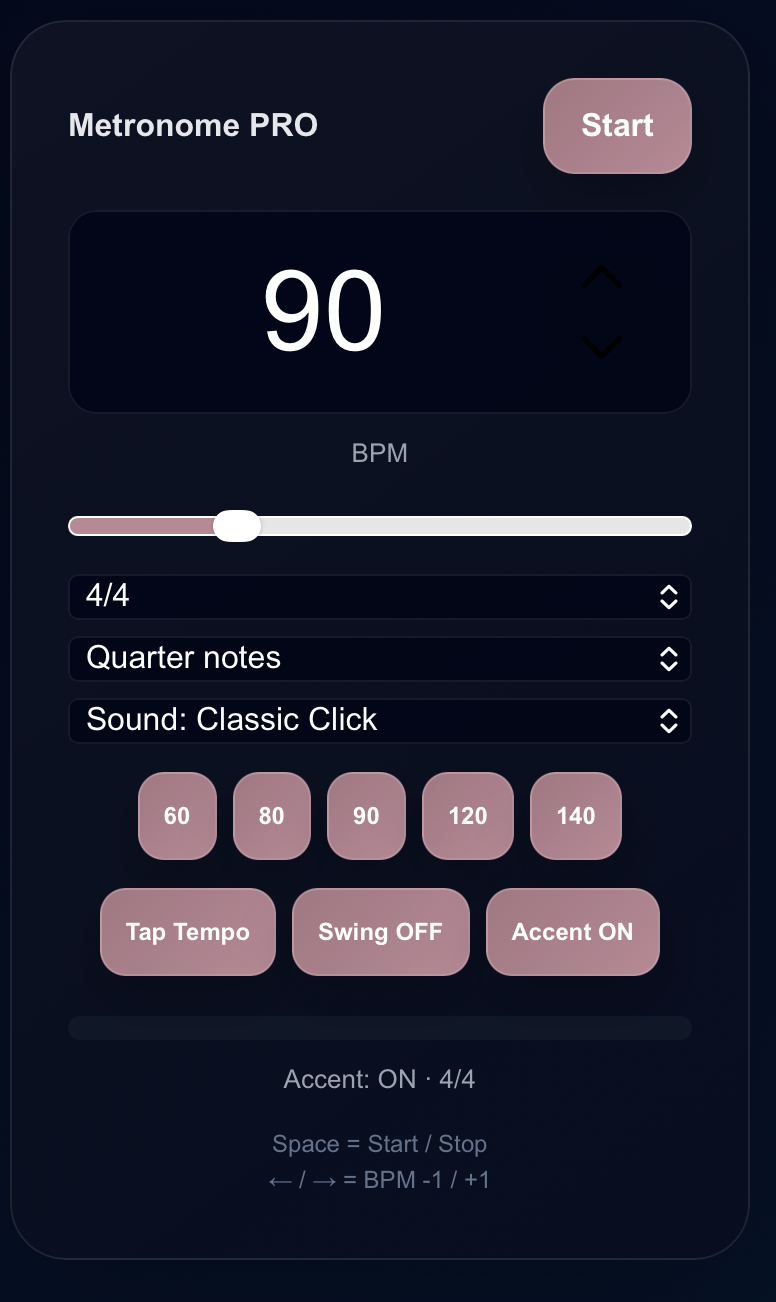
The Harniciuk Sonic Metronome PRO is free and runs entirely in your browser. It's built around what guitarists actually need in a practice session.
What makes it different
Precise Tempo
Web Audio API timing — sub-millisecond accuracy. As precise as any dedicated hardware metronome.
Customizable Beat
Time signature, note subdivision, accent on/off, and sound type (Classic Click and more).
Tap Tempo
Tap the button in rhythm to set the BPM instantly — useful when matching a song or a bandmate's feel.
Quick BPM Presets
One-click jump to 60, 80, 90, 120, 140 BPM — the most common practice tempos.
Keyboard Shortcuts
Space = Start/Stop. Arrow keys = BPM ±1. Keep hands on the guitar, not the mouse.
Understanding BPM — beats per minute
BPM is the measurement of tempo. 60 BPM means one beat per second. 120 BPM means two per second. For practice, always start 20–30% below target tempo and build up.
| BPM Range | Tempo Name | Typical use |
|---|---|---|
| 40–60 | Largo | Very slow — learning new techniques, fixing problem spotsn |
| 60–80 | Andante | Slow — careful practice, ballads, fingerpicking patternsn |
| 80–100 | Moderato | Medium — most practice sessions, chord transitions, blues riffsn |
| 100–120 | Allegro | Fast — pop and rock at performance tempo, alternate pickingn |
| 120–160 | Vivace | Very fast — speed building, metal rhythms, advanced techniquen |
| 160+ | Presto | Extreme — shredding, blast beats, top-speed technical passagesn |
How to use the metronome correctly — step by step
Open the Metronome PRO and set a tempo 20–30% below where you want to end up. If the target is 120 BPM, start at 80–90. Use the quick preset buttons (60, 80, 90, 120, 140) for fast setup, or type the number directly.
Choose 4/4 for most rock, pop, and blues. Select the note subdivision — quarter notes for basic timing, eighth notes for picking exercises, sixteenth notes for advanced speed work. Enable Accent to hear beat 1 emphasized in each bar.
Press Start and listen for 4–8 bars before touching your guitar. Tap your foot or nod with the click. Internalize the pulse before adding the complexity of playing — this step is skipped by most players and is exactly why they never fully lock in.
As you play, actively listen to where your notes land relative to the beat. Are you on the click, or slightly before it (rushing) or after it (dragging)? Rushing is more common — most players anticipate the beat rather than landing on it. Use the arrow keys to adjust BPM mid-session without stopping.
Add 5 BPM only after playing through the passage three consecutive times with zero mistakes. One clean pass may be luck. Three in a row means the motor pattern is consolidating. Make one mistake — stay at the current tempo.
When you've reached your maximum clean tempo, drop back 10–15 BPM and play through once more. Your brain encodes the last repetition most strongly — end on a clean, confident pass rather than a struggle.

Timing is invisible when it's right — and unmistakable when it's wrong.
Five metronome drills that build real timing
Set the metronome to 40–50 BPM and play quarter notes. At this speed, the long gap between clicks forces you to maintain the pulse internally. Most players immediately start rushing during the silence. This exposes — and fixes — the most common timing weakness.
Set the metronome to 80 BPM and treat each click as beats 2 and 4 only — the snare. Play full quarter notes (1-2-3-4) but only hear the click on 2 and 4. This simulates playing with a drummer and trains you to feel the full bar structure rather than just reacting to a click.
Choose a riff. Start at a comfortable tempo, play one clean repetition. Add 5 BPM with the arrow key and repeat. Continue climbing until a mistake — drop back 5 BPM, play clean once, and stop. Log your peak tempo each session and try to beat it next time.
At 80 BPM, play one bar of whole notes, one of half notes, one of quarters, one of eighths, one of sixteenths — all at the same BPM. This forces your internal subdivision to shift while keeping the pulse constant. One of the best exercises for rhythmic flexibility.
Play along for 8 bars with the metronome, then stop the click and continue playing for 8 more bars alone. Restart the metronome and check: are you still in sync? Drift reveals the limit of your internal clock. This exposes weaknesses that continuous click practice never will.
Common metronome mistakes to avoid
The most common and damaging mistake. If you can't play something cleanly at 80% of target tempo, you're not ready to practice it at full speed. Fast practice of unclean technique makes the mistakes more automatic.
When you make a mistake, most players stop then rush back in to "catch up." This teaches your nervous system to rush after errors. When you make a mistake, stop completely, let 2–4 beats pass, then re-enter cleanly on beat 1.
Playing with a metronome without listening to the relationship between your notes and the click is just background noise practice. The diagnostic value only works if you're actively hearing whether you're before, on, or after the beat.
Adding 10–20 BPM at a time feels efficient but isn't. Motor patterns need repetition to stabilize. Jump too fast and you're always working at the edge of control rather than building a solid foundation.
A metronome is a training tool, not a performance partner. Once a passage is solid with the click, practice it without — then with a backing track. The goal is a strong internal clock that doesn't depend on external reference.
Use the Metronome PRO for isolated technique where you need a pure click. Then switch to the Harniciuk Sonic Backing Track Generator at the same tempo — drums, bass, harmony. The transition from click to full band is where timing becomes feel. Both are essential; neither replaces the other.

Frequently asked questions
Is an online metronome accurate enough for serious practice?
Yes. The Harniciuk Sonic Metronome PRO uses the Web Audio API for timing — sub-millisecond accuracy that is more than sufficient for guitar practice at any level, equivalent to dedicated hardware metronome apps.
What BPM should a beginner start with?
For chord transitions, 40–60 BPM. For single-note exercises and scales, 60–70 BPM. It should feel almost uncomfortably slow — that's usually right. Most beginners vastly underestimate how slow they need to practice for technique to develop cleanly.
What does Tap Tempo do?
Tap Tempo lets you set the BPM by tapping a button in rhythm — useful when you want to match the tempo of a song you're listening to or a bandmate's feel without calculating the number. The metronome averages your taps and sets the BPM automatically.
Should I always use a metronome when practicing?
Not always. Use it for technical work, learning new passages, and building speed. Don't use it for creative exploration, improvisation discovery, or learning the feel of a new song. The metronome is for consolidating technique and building your internal clock — once built, practice without it too.
What's the difference between a metronome and a drum machine?
A metronome produces a simple click — pure timing reference. A drum machine produces rhythmic patterns with groove and feel. Both are useful: the metronome for isolating timing in technique practice, the drum machine (or backing track) for developing feel in a musical context.
Open the Metronome PRO now
Free, instant, no sign-up. Set your BPM, start the click, and build the timing that separates good players from great ones.